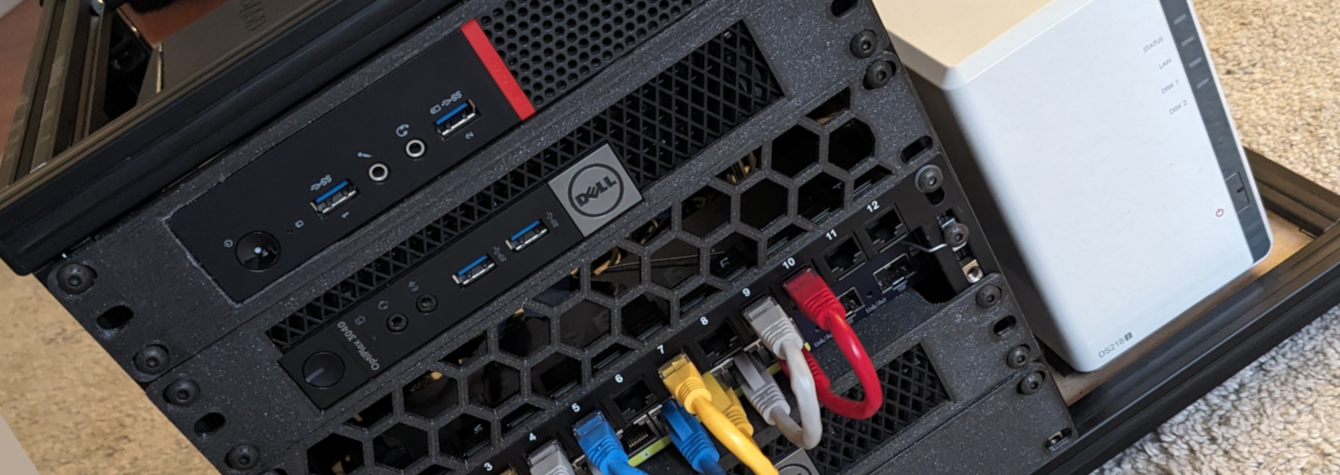
I fell into the Homelab rabbit hole a while back. Here’s all the toys it’s composed of. A few computers, a switch, an AP, nothing too fancy, but plenty enough to have fun and host a bunch of things.
Click here to know more about my Homelab
Hardware List
- Router: Lenovo ThinkCentre M700 10HY
- Server: Dell Optiplex 3040 Micro
- Server: Dell Optiplex 7050 Micro
- Network Switch (managed): Netgear GS110TP
- NAS: Synology DS218j
- WiFi Access Point: Ubiquiti U6-Pro
Router
I’m using a Lenovo ThinkCentre M700 with an Intel i3-6100T CPU (3.20GHz, 2 cores, 4 threads), 4GB of RAM. It had a 500GB HDD, I’ve replaced it with a 256GB NVME SSD. This is my last acquisition. I bought it cheap, specifically to be used as a router when I decided to move Pfsense onto bare metal instead of a VM.
I’ve replaced the WiFi M.2 card with a mini PCIe 1Gbps ethernet card to have a second ethernet port. 1 port goes to my ISP router, the other port goes to the switch.
I’ve installed PFSense on it. I was familiar with configuring ISP routers, but Pfsense is a different beast that require a bit or research and learning. There are a ton of videos and articles about it though, which helped me getting it setup and configured in an hour or two.
After doing more research, PFSense isn’t the most well-regarded, especially in the open source community. Opnsense is probably a better option. They are very similar though, and for home use, it doesn’t really matter which one you go for.
Talking about my ISP router, it’s configured in gateway mode, with WiFi disabled, as I’m fully relying on my own hardware. That already proved its usefulness when I switched ISPs. I just had to switch the previous IPS’s router to the new one, and that was it. My entire network stayed intact.
The Lenovo I’m using is actually a bit much for my use-case. I currently have 19 devices on the network (physical + virtual). The network activity is rather calm. The public sites I’m hosting aren’t getting a lot of traffic. My Arr stack 🏴☠️ sharing Linux ISOs is rather quiet as well. CPU is sitting at 1% usage most of the time. It climbs up to 11-13% when I transfer a file from a device to another, at full 1Gbps speed. Watching a 4K YT video brings it to 3-5%. RAM is at 11% constantly.
Servers
The Dell Optiplex 3040 Micro is the first computer I bought for my homelab to be used as a server. It has a i5-6500T (4 cores, 4 threads), 8GB of RAM and 256GB SSD. It was great to begin with, play around and experiment.
I got another Optiplex Micro, 7050, it was cheap and more recent than the 3040, couldn’t pass the deal. It has a i5-7500T (4 cores, 4 threads), 8GB of RAM and a 256GB NVME SSD. I decided to upgrade it a little bit as I wanted to use it as my main server. I found a cheap 32GB kit of DDR4 (2 x 16GB sticks) to upgrade the poor 8GB. The person I got the sticks from ordered 2 from Amazon and receive a whole box of them, lucky him! The Optiplex had an empty Sata SSD tray, I’ve installed a Crucial MX500 1TB SSD in there.
Those 2 servers are running Proxmox. It’s the most popular hypervisor amongst the homelab community. It’s excellent for managing virtual machines, very easy to use.
The 3040 is turned off most of the time as the 7050 can already handle quite a lot with its upgrades.
The 7050 is on 24/7. CPU is usually sitting at 1%, it obviously varies depending on the apps/docker containers usage. RAM is doing alright at 55%, but it’s clearly the limiting factor. Each new app/container it hosts will make that % go up.
Switch
Not much to say about that Netgear GS110TP, it’s quite old but does the job well. I wanted one that can handle VLANs and has PoE. Bought the most suitable and cheap one I could find on Marketplace.
NAS
I’ve had my Synology DS218j NAS for a dozen years. It’s been solid and hasn’t let me down. I’ve got 2 12TB drives in there, configured as mirror for redundancy (so 12TB effective storage). Yes, it’s very basic and its tiny CPU can’t handle much more than file sharing, but it’s way enough for my use-case.
WiFi Access Point
I wanted something pretty good, fast, which can handle VLANs. The U6-Pro is probably a bit much for what I use it for, but it offers good customization and is powered via PoE. Ubiquiti is a popular brand amongst enthusiasts as well, so it seemed like a good choice. It’s only WiFi 5, but I honestly have no use for WiFi 6.
After setting it up, I understand why people like Ubiquiti. The admin interface is nice, offers a lot of customization, and the hardware seems solid.
Custom Mini Rack
At some point, I got annoyed seeing my devices just stacked up precariously on top of each other, so I started looking into how I good improve that.
Professional datacenters use server racks to organize their hardware. They’re based on a 19in width so they’re way too big. But there’s 10in rack form factor that exists, which is perfect for my hardware. However, I couldn’t find something that looked nice enough and was the right size. So I built myself a mini rack using aluminium profiles. The end result is pretty nice, if I do say so myself. I got someone to print me rack mounts for my computers. I found them on Printables.

Look at this cutie

The ugly side
Future plans
The Power Situation
The least sexy part of the homelab: 5 power bricks and their cables. I managed to fit them all at the bottom of the rack but it’s clearly just a big mess of cables and black boxes. I’ve looked around to try and find a replacement and found a few things, but this reddit post is by far the most exciting PSU alternative I found.
The reddit user built himself a glorified USB-C charger with 5 ports that can deliver more than 300W total. He uses USB-C to power jacks adapters that connect to his Dell Optiplex’s. I didn’t even know those adapters existed. They’re very neat and take advantage of the USB-C power delivery feature to deliver the appropriate voltage to whatever device you need to power. You can find all kinds of them, including specific ones for Dell, Lenovo and HP computers, and they’re cheap.
That’s the direction I’m taking. I’m not sure if I’ll build my own USB-C power delivery system, or just buy USB-C charging plugs. But that’ll clean things up nicely.
I’ve done some testing to see how my power my computers need. The Optiplex 3050 and Lenovo both need around 30W when the CPU is at full 100% usage (which pretty much never happens).
GPU for local AI slop?
I have an old RTX card lying around and apparently I could connect it to one of my Optiplex’s using an NVME to PCIe adapter. I could then use it to run light AI tasks like image recognition, video transcoding, or even run small LLMs locally. But that would require some work and I honestly don’t really have a use for those features (for now).
Not had enough? Check out the other Homelab articles